Coming soon to Google Play

Clear the clutter.
Keep your calm.

CleanMonk finds the junk, duplicates and big files filling your phone, sorts your photos right on the device and shows your phone's vitals live. You see exactly what will go before anything does.

  • No ads
  • No account
  • Files stay on your phone
  • Pro is one-time
Smart Scan result: health score 75, junk, duplicates and unused apps
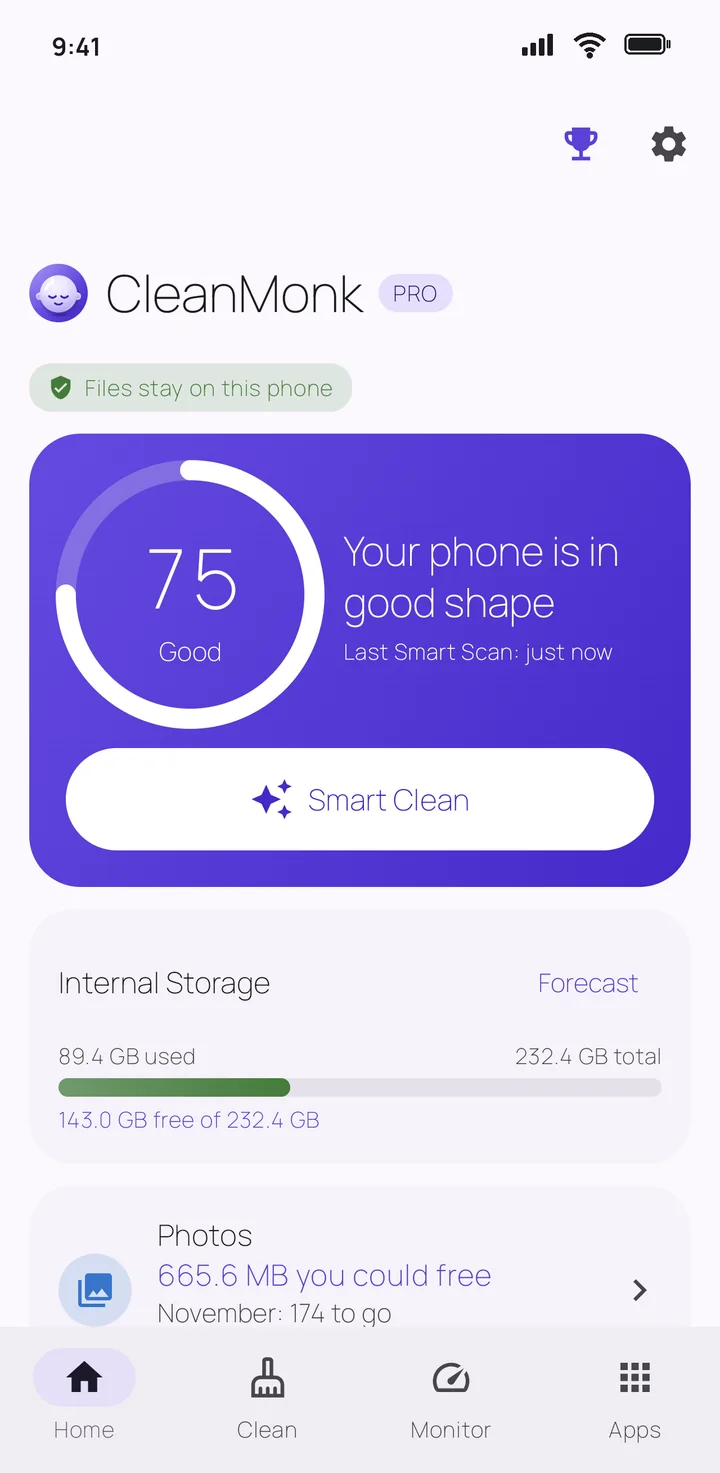
CleanMonk home screen with a health score of 75 and internal storage use
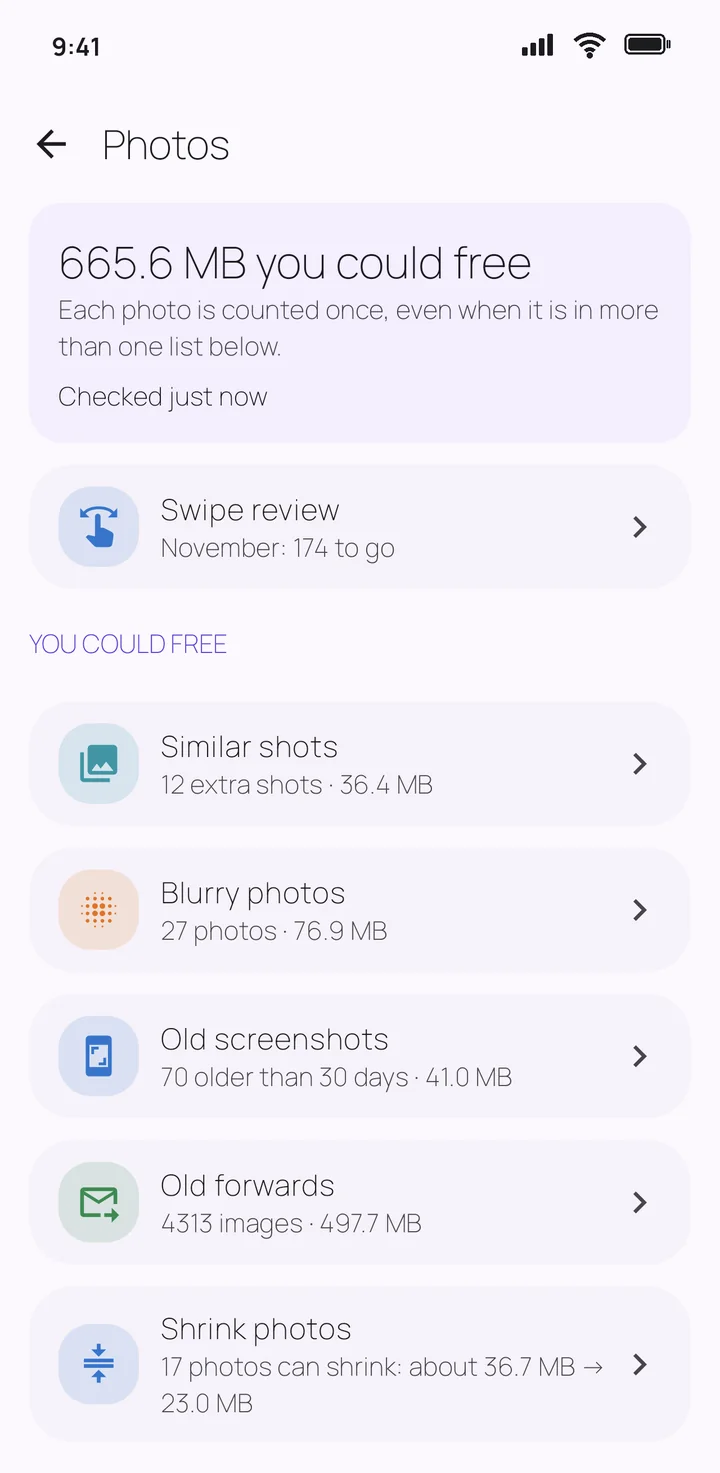
Photos hub: 665.6 MB you could free across similar shots, blurry photos, old screenshots and forwards
15+cleaners and tools in one app
1 GBof cleaning free, every scan free
0ads, accounts or analytics of our own
1×Pro is a one-time purchase
Clean

Know where your space went. Then take it back.

One scan covers junk, duplicates, big files, photos and apps. Every result shows its size, and you pick what goes.

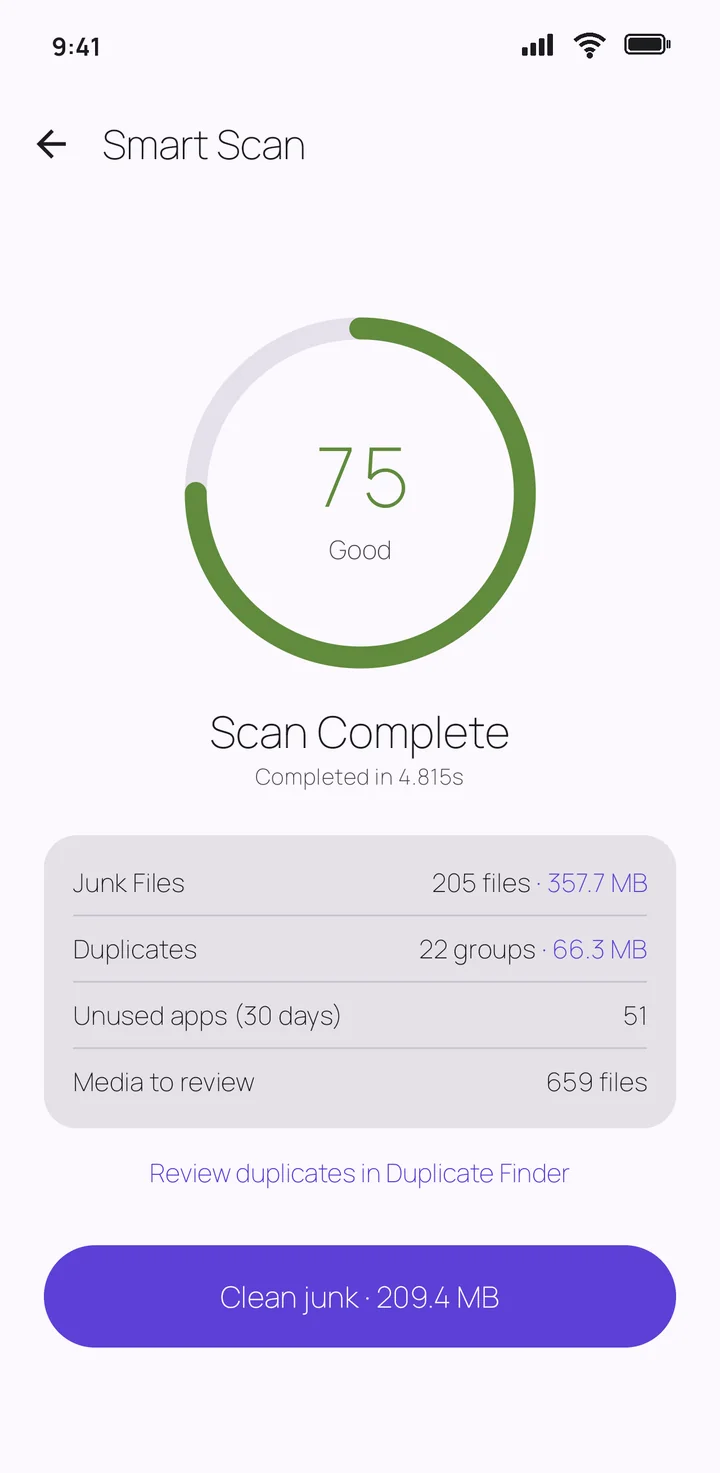
Smart Scan finished: health score 75, 205 junk files, 22 duplicate groups, 51 unused apps
Smart Scan

One tap, one honest health score.

Smart Scan checks storage, junk and duplicates in a few seconds and sums it up in a score you can act on. The Home screen keeps it in view, next to how full your storage is and when it will fill up.

  • Junk: cache, temp and log files (left alone for a day first, so nothing in use is touched)
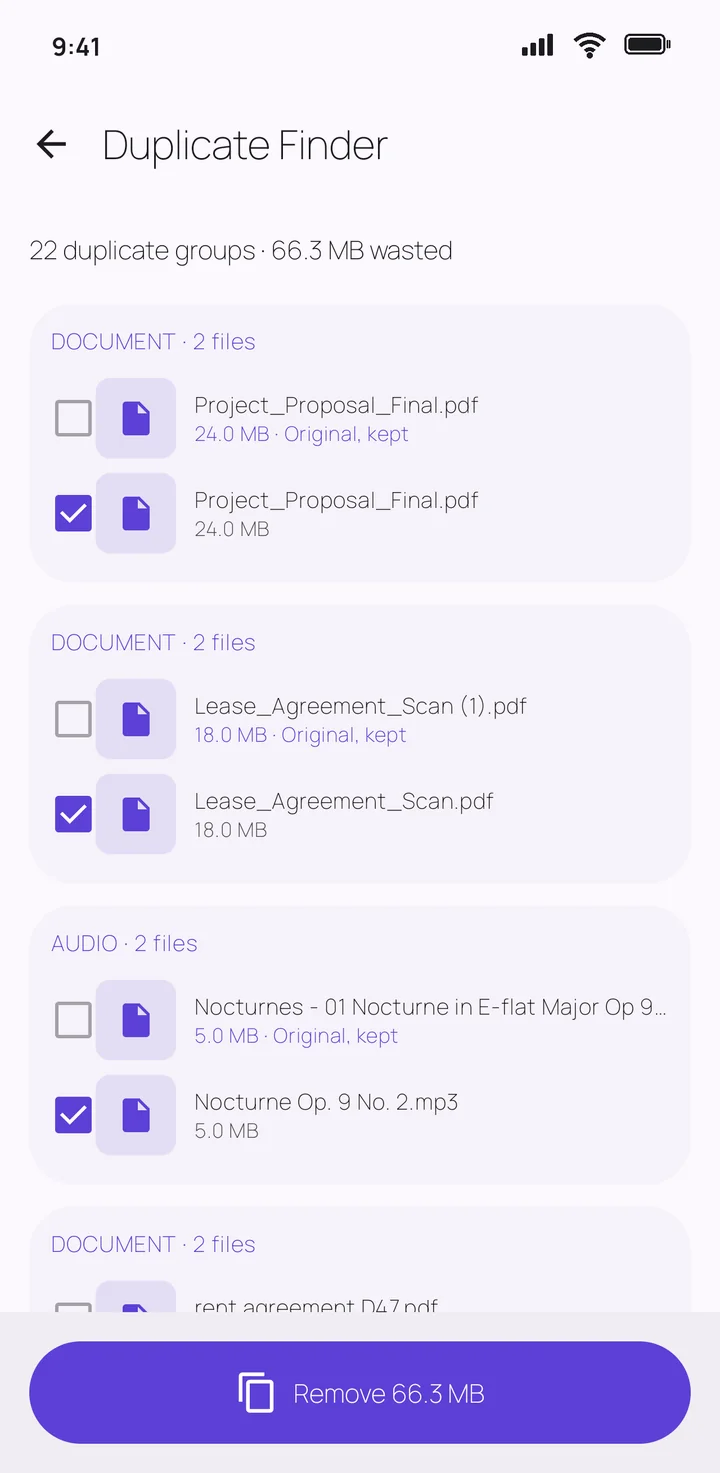
  • Duplicates matched by content, with the original kept
  • Apps you haven't opened in 30 days, with what they take up
  • Storage Forecast: a warning about two weeks before your phone is full
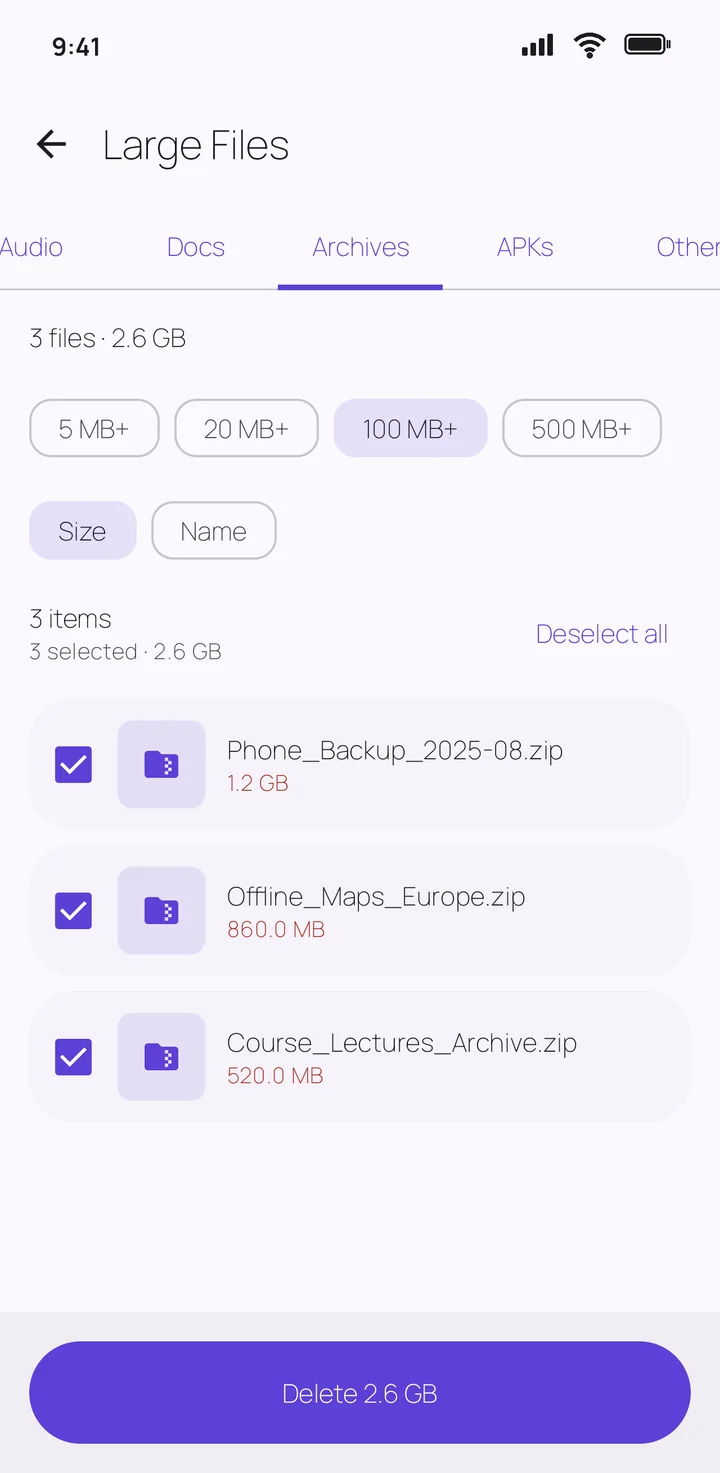
Large Files on the Archives tab: three archives selected, 2.6 GB
Duplicate Finder: 22 duplicate groups, 66.3 MB wasted, original kept in each group
Large files & duplicates

The big stuff, sorted by size.

Videos, archives, documents, audio and old installers, filtered from 5 MB to 500 MB and up. Duplicate Finder compares the files themselves, not just their names, and keeps one copy of each.

  • Large Files, Old Files, Downloads, APK Cleaner and App Leftovers
  • Empty folders and system leftovers like thumbnails and temp files
  • Protected folders you choose are never touched
  • Deletes are real and permanent, so CleanMonk always asks first
Photos hub listing similar shots, blurry photos, old screenshots, old forwards and photos that can shrink
Photos

Your photos, tidied on the phone.

CleanMonk looks through your gallery on the device and adds up what you could free, counting each photo once. Then review it your way, list by list or one month at a time.

  • Similar shots and bursts, blurry photos, old screenshots and forwarded images
  • Swipe Review: left to delete, right to keep, up to shrink
  • Shrink photos in place, keeping their date and location
  • Video Compressor to 1080p, 720p or 480p, right on the phone
  • WhatsApp and Telegram media cleaners

Photo labelling uses Google ML Kit on the device. On supported phones, Smart Cleanup can also use Gemini Nano, which runs on the phone too.

Monitor

Your phone's vitals, live.

CPU speed, memory, temperatures, battery power and network, updated every second. History keeps the last day as charts you can export, and two short tests show how fast your phone is and how much it slows down when hot.

LiveCPU, memory, temperature, battery, network
HistoryCharts for the last 1, 6 or 24 hours, CSV export
TestsA quick benchmark and a 60-second throttle test
Monitor screen: CPU speed 20 percent, memory 53 percent, CPU temperature 38 degrees
Benchmark results for processor, memory and storage, and the throttle test
Floating monitor

A small live card over any app.

Battery, charging power, current and temperature float on top of whatever you are doing. Tap it for power and network, hold it for its menu, drag it anywhere, and drop it on the X to close it.

  • Free everyday pages: Vitals, Power and Network
  • Alerts for a hot battery, a low battery and overheating while it runs
  • Pro adds My page, a charging coach and session reports
  • Home-screen widgets for vitals and photos
The floating monitor card showing 60 percent battery, charging power, current and temperature over the CleanMonk home screen
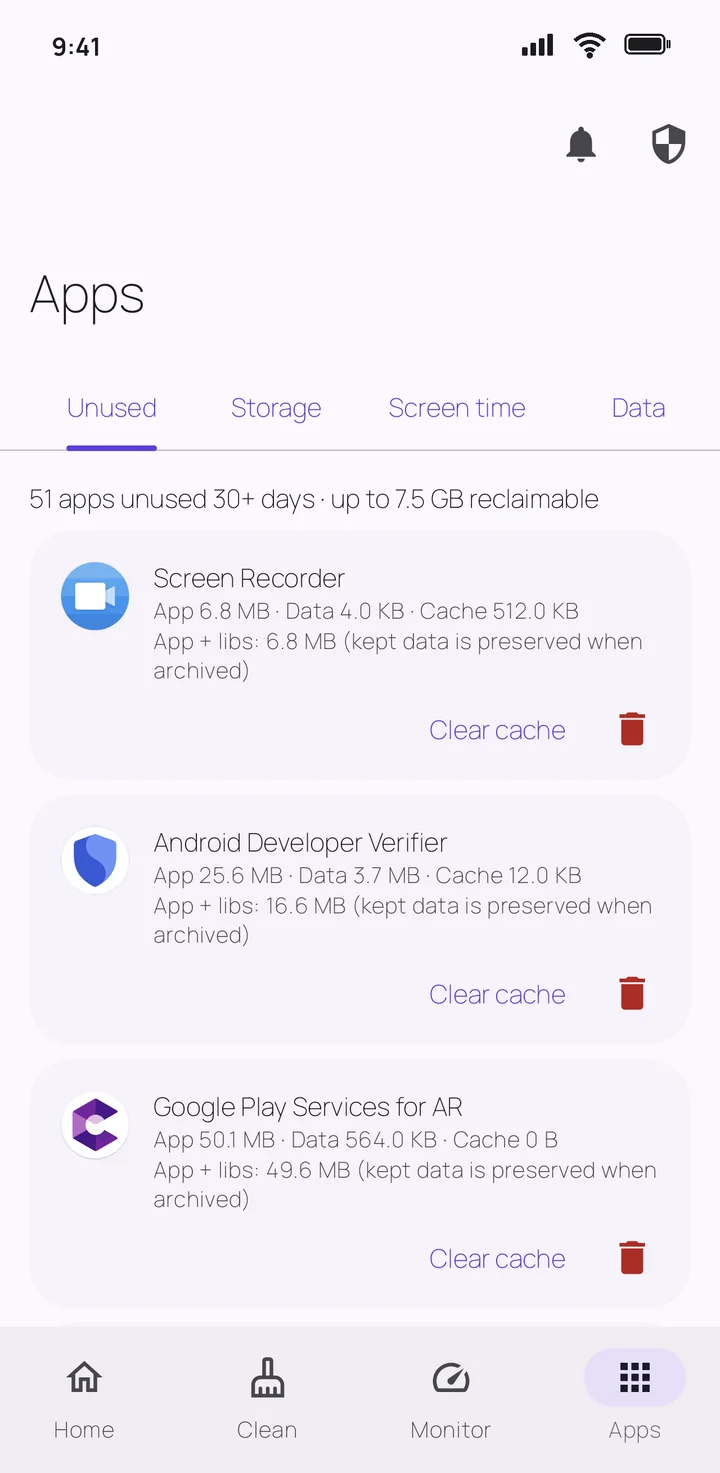
Apps tab: 51 apps unused for 30 days or more, up to 7.5 GB reclaimable
Apps

See which apps earn their space.

Four views of the apps on your phone: the ones you no longer use, the ones taking the most storage, where your screen time goes and which apps use the most data.

  • Uninstall in a tap, or archive an app and keep its data (Android 15 and later)
  • Open an app's own settings to clear its cache
  • Permission audit and notification overview
Everything inside

One calm app instead of five busy ones.

Quick clean

Smart Cleanup

Type what to clean in plain words, like "large files over 500 MB".

Junk Cleaner

Cache, temp and log files, with a size for each group.

Auto Clean PRO

Clears safe junk on a schedule, only while charging if you like.

Storage Forecast

Learns how fast your storage fills and warns you ahead of time.

Storage

Large Files

Big videos, archives and documents, filtered by size.

Duplicate Finder

Identical copies, matched by content. Keeps the best one.

Old Files

Files untouched for 30 days or more.

Downloads & APKs

Old downloads and leftover app installers.

App Leftovers

Folders left behind by apps you removed.

Empty Folders

Empty and hidden folders cluttering your storage.

Folder Explainer

What each folder on your phone actually holds.

Storage Browser

Browse every folder: preview, copy, move, share and delete.

Photos & videos

Photo cleaner

Similar shots, blurry photos, old screenshots and forwards.

Swipe Review

A month of photos at a time: swipe to keep, delete or shrink.

Shrink Photos PRO

Same photos, less space, same date and location.

Video Compressor

Shrink videos to 1080p, 720p or 480p on the phone.

AI Photo Analysis

Finds blurry shots, memes and bursts, on the phone.

Media Cleaner

Your largest photos and videos in one list.

Private vault

Hide photos and videos behind a PIN.

WhatsApp & Telegram

Forwarded, received and downloaded media in one place.

Device

Live monitor

CPU, memory, temperatures, battery and network.

Floating monitor

A live card over other apps, plus a Quick Settings tile.

Battery

Health, temperature, current, estimated capacity and charge cycles.

Apps

Unused apps, storage, screen time and data use.

Privacy

Your files never leave your phone.

Scanning and cleaning run on your device. CleanMonk has no account, no ads and no analytics of its own, and it never uploads or sells your files.

Read the privacy policy for every detail.

  • On the deviceScans, photo sorting and history are stored only on your phone.
  • You decide what goesEvery delete shows what will go and asks first. Android asks again before photos and videos are removed.
  • Honest about GoogleGoogle ML Kit labels photos on the phone and sends Google usage and performance metrics, never your photos.
Free & Pro

Scan everything free. Pay once if you want more.

No subscription and no ads. Pro is one payment through Google Play.

Free

Free to download

  • Every scan and every result
  • Your first 1 GB of cleaning
  • Storage Browser, including delete
  • Video Compressor, one video at a time
  • Private vault, up to 20 items
  • Live monitor, history and tests
  • Floating monitor everyday pages
  • Apps, forecast and storage alerts

CleanMonk Pro One-time

Pay once. Not a subscription.

  • Delete with every cleaner, no 1 GB limit
  • Shrink photos in place
  • Auto Clean on a schedule
  • Compress several videos at once
  • Unlimited private vault
  • Floating monitor extras: My page, charging coach and session reports

The app shows the price in your currency, as Google Play sets it. Payments go through Google Play.

Screens

Light or dark, it stays calm.

Material 3 design in CleanMonk violet, with a dark theme, AMOLED black and Material You colors if you prefer your wallpaper's.

FAQ

Good questions.

Is CleanMonk on Google Play yet?

Not yet. CleanMonk is in testing and is coming soon to Google Play. This page will link to the store listing once it is live.

Which phones does CleanMonk work on?

Android 11 or later, on phones and tablets. On tablets the tabs move to a side rail. The app is in English.

Does CleanMonk upload my files?

No. Scanning and cleaning run on your phone, and CleanMonk never uploads your files or storage data. It has no ads, no account and no analytics of its own.

Google ML Kit, which labels photos on the device, sends Google usage and performance metrics such as device and app details, never your photos. The privacy policy lists everything.

Why does it ask for access to all files?

To find junk, leftovers, empty folders and big files anywhere in your storage, not only in your photo gallery. Without it, CleanMonk can still scan your photos and videos, but those cleaners would miss most of what they look for.

Can CleanMonk clear other apps' caches?

Android does not let any app empty another app's cache by itself. CleanMonk shows which apps hold the most and opens that app's settings page in one tap, where you clear it. CleanMonk's own Junk Cleaner removes cache, temp and log files it is allowed to reach.

Can I undo a delete?

No. CleanMonk deletes for real instead of hiding files in a bin that still takes space. That is why every delete shows exactly what will go and asks first, and why Android asks again before your photos and videos are removed. Folders you protect are never touched.

What is free and what is Pro?

Every scan is free, and so is your first 1 GB of cleaning, the Storage Browser, the Video Compressor (one video at a time), the vault (up to 20 items), the live monitor and the floating monitor's everyday pages.

Pro unlocks deleting with every cleaner, Shrink photos, Auto Clean, several videos at once, an unlimited vault and the floating monitor extras. It is a one-time purchase through Google Play, not a subscription.

Is the private vault encrypted?

No, and we won't claim it is. The vault moves photos and videos into CleanMonk's private storage and hides them behind a PIN, but it does not encrypt them. Uninstalling CleanMonk or clearing its storage deletes what is in the vault, so move items out first.

CleanMonk app icon
A calm, clean phone is coming.

CleanMonk is in final testing. It will be on Google Play soon.

Coming soon toGoogle Play